When paper files or electronic devices contain sensitive information, store them in a locked cabinet or room.
Web applications use session or cookie to store data temporarily. So these data can persists sometimes even after the session has been closed. So it might be possible to access the private or sensitive data exchanged within the session through the web browser or proxy cache.
The ‘Cache-control’ HTTP header holds instructions for caching in both requests and responses. Because the ‘Pragma’ header is used for backwards compatibility with HTTP/1.0 where the ‘Cache-control’ header is not yet presented.
If sensitive information in application responses is stored in the local cache. So this may be retrieved by other users who have access to the same computer at a future time.
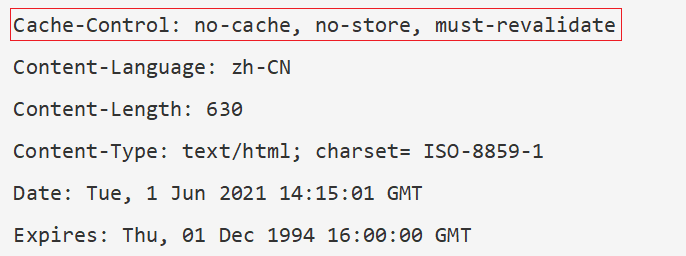
Tested in Apache Web Server 2.2, Browse the URL and Look at your Response Header
– Make sure the ‘Cache-control’ HTTP header is set with ‘no-cache, no-store, must-revalidate’ and the ‘Pragma’ header is set to ‘no-cache’ on HTTP response where possible.
Cache-Control: no-cache, no-store, must-revalidate
Pragma: no-cacheBrowse the URL and Look at your Response Header and you will see Cache-control info updated.
Fixing Cache issue alone won’t protect your website from all the security threats. Ensure to follow Web Application security checklist and leverage eCyLabs Web Application Firewall could protect from this kind of issues at the Firewall level.
Leverage eCyLabs ASPM to get 360 degree view of your application security posture from code to cloud. Our Marketplace approach is cost-effective and efficient way for security and compliance monitoring.
![enquiry[at]ecylabs.com](https://ecylabs.com/wp-content/themes/ecylanding/assets/img/bg-img/contact_enquiry_ecylabs.png)
 English